 |
 |
|
 |
||
 |
||
 |
||
 |
Home |
 |
 |
 |
|

Managing the Quarantine Folder
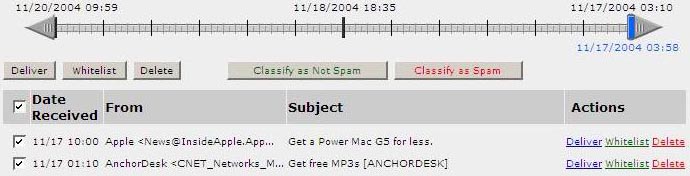
Barracuda allows you to view a list of messages in your email quarantine. From there, you can classify the messages as Spam or Not Spam. However, marking messages as spam has little value for most users and takes much longer than simply deleting the messages. To delete an entire page of messages at a time, click on the check box to the left of the 'date received' header at the top of the list (which selects all of the messages on the page) and select 'delete'. You can choose to:
-
Delete the message from the server
-
Whitelist (add the sender to your Whitelist)
-
Deliver the message to your Inbox
Select the messages by clicking on the checkbox, then click the button above the list to perform the action. You may also click on the links beside the messages to perform these actions. Be sure to check your quarantine folder often to prevent losing any wanted email messages. The spam messages will be automatically be deleted after 30 days if you take no action.

