| The Barracuda Spam Filter creates a spam score for each message and determines whether to quarantine a message based on this score. You can avoid all scoring of messages from specific e-mail addresses by adding these addresses to the Whitelist. To change the scoring thresholds, go to the 'Preferences' tab under 'Spam Settings'. Click "NO" under "Use System Defaults" and 'Save Changes'.
You may then adjust the quarantine settings and save your new settings. Enable blocking only with caution. Blocked messages are not recoverable and will not even show up in your quarantine mailbox. Adjusting the quarantine threshold downward from the default 2.5 value may help catch more spam. This setting can be adjusted in increments of a tenth of a point. If you do adjust your quarantine setting down, watch your quarantine mailbox closely for "false positives' in order to prevent losing important e-mail.
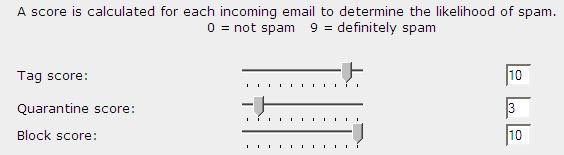
Scoring is based on the 1 - 10 scale, the lower the setting, the
greater sensitivity. (A setting of 10 disables the feature)
Mail will be assigned to one of the following categories:
Tagging (Default Setting = 10)
Tagging adds the phrase [SPAM] to the subject line if the message
is determines as spam. Mail continues to be delivered to your mailbox.
Quarantine (Default Setting = 3)
Messages determined to be spam will pass to your Barracuda Quarantine
folder.
Blocking (Default Setting = 10)
Messages blocked are immediately deleted and not recoverable. Use
this setting with caution. |